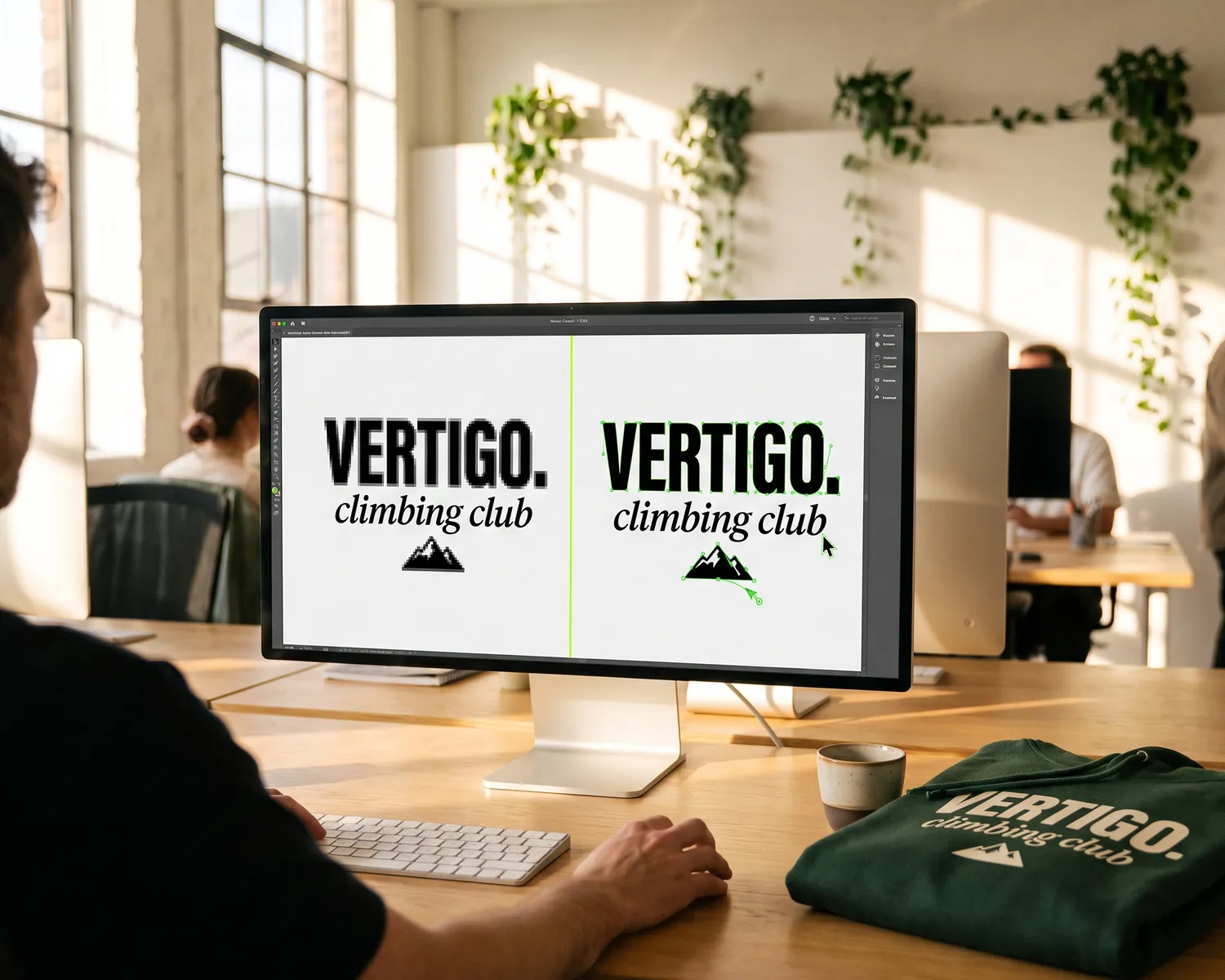
Vectorize a logo: 3 ways to do it, one of them free
You can vectorize a logo in three ways: a free tool, Depixelise or Inkscape, for a simple logo; a graphic designer, from €16.54, for a complex one; or, if it is going on a garment, the "Vectorize" button in the tknp.io designer, which traces a one-colour PNG.
The essentials in 4 points:
- Vectorizing means turning a grid of pixels into shapes described by their outlines: the logo stays sharp at any size.
- There are three ways: a free tool (Depixelise online, Inkscape to install), a paid professional (a graphic designer or a precision tool), and the tknp.io designer for a logo meant for a garment.
- Automatic vectorization works on a simple logo with flat colours; it fails on gradients, photos and small text.
- For a custom t-shirt or sweatshirt, a sharp high-definition PNG is often enough, and the tknp.io designer vectorizes a simple one-colour logo itself.
"Please send us your logo as a vector file." The request often lands at the worst moment: the merch order is ready, the date is close, and the only file available is a PNG taken from the association's website or an email signature. Nobody on the team has Illustrator, and the graphic designer who created the logo five years ago no longer replies.
The good news: in most cases, this is solved quickly, often without spending a cent. Here are the three ways to vectorize a logo, what each one costs, and how to know which one suits yours.
What does vectorizing an image actually mean?
Vectorizing an image means redrawing a pixel-based image as mathematical paths. A JPG or a PNG is a grid of coloured dots: enlarged, it becomes blurry and jagged. A vector file describes each shape by its outline, so it can be spread across a whole sweatshirt back or shrunk to a chest logo without losing any sharpness.
The common vector formats are SVG, vector PDF, EPS and AI (Illustrator's native format). Beware the classic trap: a PNG placed inside a PDF is still a pixel image, even if the extension changes. To check whether your current file is already vector, the test in our file guide takes a single step.
The 3 ways to vectorize a logo
| Way | Price | For whom | Its limit |
|---|---|---|---|
| A free tool (Depixelise, Inkscape) | €0 | a simple logo, right away | rough outlines on a detailed logo |
| A professional (graphic designer or precision tool) | from €16.54 per listing on ComeUp; €8.99 a month for a precision tool | a blurry logo, fine text, a gradient | a turnaround and a brief for the graphic designer, a subscription for the tool |
| The tknp.io designer | no price shown for the button | a one-colour logo, as a PNG, meant for a garment | turns down a logo with several colours; only works for catalogue products |
The prices in this table were checked on 6 November 2026 on the tools' websites, on ComeUp's "vectoriser logo" search and in the tknp.io designer.
1. A free tool: Depixelise online or Inkscape to install
For a simple logo, a free tool gives you a vector file in seconds online, or in a few clicks in software.
Online: Depixelise, the free vectorization tool launched by our group. With no sign-up, no paid version and no watermark, it takes logos in PNG, JPG, WebP or SVG up to 10 MB. You see the result in full size, then receive by email the SVG and a print pack: a transparent PNG, an all-black version and an all-white one.
To install: Inkscape. To vectorize a logo in Inkscape, import the image, select it, then open the Path menu and the Trace Bitmap command (shortcut Shift + Alt + B). Choose a single-colour trace for a one-colour logo, a multi-colour trace otherwise, run it, delete the original image left underneath the trace, and save as SVG or PDF.
Inkscape is free vector drawing software (GNU GPL licence), available at no cost on Windows, macOS and Linux: it does the same job as an online tool, with more control over the trace.
2. A graphic designer or a precision tool: when the logo is complex
When the free tool leaves wobbly edges or misshapen letters, two paid options take over: a precision tool, or a graphic designer who redraws the logo.
Vector Magic and Vectorizer.AI often give cleaner outlines on tricky logos. You can vectorize and preview as many images as you like, but downloading requires a subscription of €8.99 per month (Vector Magic also sells a desktop version at €274 per licence).
In Illustrator, vectorization starts from the Window menu, Image Trace panel: you choose a preset, adjust the number of colours and the precision, then click Expand to get paths you can edit one by one. It's the finest tool, but it runs on an Adobe subscription: best kept for those who already have it.
A graphic designer, for their part, redraws the logo by hand, curve by curve, and finds the right typeface instead of tracing the blur. On ComeUp, a French freelance platform, the search "vectoriser logo" returned 52 listings on 6 November 2026: the ones that vectorize a logo start at €16.54, and the average budget shown ranges from €25 to €150 depending on the job. Allow a few days' turnaround and have your brand's exact colours ready.
3. The tknp.io designer: if the logo is going on a garment
If your logo is meant for a t-shirt, a sweatshirt or a cap from the catalogue, the tknp.io designer can vectorize it itself, on one condition: a one-colour logo, uploaded as a PNG. As soon as a PNG is placed, a "Vectorize" button appears; it turns the logo into paths, and the designer sums it up like this: "A traced logo stays sharp at every size."
This button follows a single ink. A logo with several colours is turned down, with the advice to upload a monochrome version, and artwork that is too detailed cannot be traced either, though it "still prints as an image". The button shows no price, and the designer opens from the "Customise online" button on a product page; opening an account costs nothing. At checkout, the basket adds technical and administrative fees, which cover file preparation, order handling and, for embroidery, the logo's stitch programme: the site waives them for everyone.
When automatic vectorization fails
An automatic tool traces what it sees, flaws included. It almost always fails in four cases:
- Gradients and photos: they turn into stepped patches of colour, because the tool cuts the shades into flat areas.
- Small text: letters stick together or lose their serifs.
- Blurry edges: a heavily compressed JPG or a screenshot gives wobbly outlines, faithfully reproduced by the tool.
- Very colourful logos: the tool invents stray shapes between two close shades.
To judge the result, zoom in hard on the edges and the text. If the curves are smooth and the letters match the original, the file is good. If it wobbles or a letter has changed shape, move on to Illustrator or a graphic designer rather than fixing it point by point.
Incidentally, a logo designed in a single colour vectorizes far better than a ten-colour logo, and in screen printing each colour removed is one screen fewer: our guide to logo types explains why the one-colour version almost always wins on fabric.
Why your printer asks for a vector file
A textile printer asks for a vector file because two techniques really need one: screen printing and embroidery.
- In screen printing, every colour in the logo needs its own screen: the workshop has to separate clean flat areas, colour by colour, which a pixel file doesn't allow (why one screen per colour: how t-shirt screen printing works).
- In embroidery, the workshop converts the logo into a stitch programme: starting from clean shapes makes this step simpler and more faithful.
- In DTF and DTG, the file is printed as is: a high-definition PNG is enough, and they are the two techniques that render photos and gradients well.
To see exactly what our workshop expects, technique by technique (minimum text size, line thickness, resolution), everything is in the guide to preparing your logo.
For a garment, a sharp PNG is often enough
A logo with several colours often doesn't need vectorizing to end up on a garment: DTF and DTG both print a sharp high-definition PNG as is. What matters is the quality of the starting file.
The tknp.io designer accepts PNG, SVG, JPEG and WebP files up to 10 MB and measures their resolution on import: if the logo is too small for the chosen size, it suggests making it smaller, vectorizing it or uploading a larger file. That leaves the logo no button can rescue, such as a screenshot or a file under 500 pixels wide: our logo preparation guide warns that a logo the workshop has to redraw or vectorize is quoted separately, before work starts.
The full process, from uploading the logo to ordering, is laid out step by step in this guide. The right reflex before looking for software: open the catalogue, place your PNG on a t-shirt, and look at the result.
Key takeaways
- A simple logo can be vectorized for free with Depixelise, online, or with the Inkscape software; a precision tool, Illustrator or a graphic designer are for complex logos.
- Automatic vectorization fails on gradients, photos, small text and blurry edges: zoom in on the result before sending it.
- For a custom garment ordered from us, a simple one-colour PNG is vectorized with one button in the designer, and a sharp high-definition PNG is enough for DTF as for DTG.
Frequently asked questions
How do you vectorize an image for free?
With an online tool such as Depixelise (no sign-up, no paid version, SVG and print pack sent by email), or with the free software Inkscape, available at no cost on Windows, macOS and Linux. These solutions work well for simple logos with flat colours.
Can you vectorize a photo?
Technically yes, but the result looks like a flat-colour poster: the shades become blocks of colour. To put a photo on a garment, it's better to keep the image in high definition and choose DTF or DTG printing, which reproduce gradients.
How much does it cost to vectorize a logo?
From €0 with Depixelise or Inkscape to €8.99 per month for precision tools such as Vector Magic or Vectorizer.AI (prices checked on 6 November 2026). With a freelance graphic designer, ComeUp's vectorization listings start at €16.54, and the average budget shown goes up to €150 for artwork that has to be redrawn entirely. In the tknp.io designer, file preparation is part of the basket's technical and administrative fees, waived for everyone.
What is a vector image?
A vector image is an image described by shapes (lines, curves, flat areas) rather than pixels, which lets it be enlarged or reduced without losing sharpness. You can recognise it by its formats: SVG, vector PDF, EPS or AI. It's the ideal format for a logo, whether it's printed on a business card or across a whole sweatshirt back.
Your project, quoted within 24 hours.
Describe your garments, your decoration and your quantities: you receive a detailed quote, decoration included, within one business day.